
mcp-geo — the AI visibility MCP server.
Track ChatGPT, Claude, Perplexity, Gemini, and Google AI Overviews citations of your brand. MIT licensed. Self-host on your own Cloudflare account.
- Worker / local tools
- 6 / 9
- AI engines
- 5
- Setup time
- ~5 min
- License
- MIT
About
What is mcp-geo?
mcp-geo is an open-source Model Context Protocol (MCP) server for tracking how your brand is cited by AI search assistants. It runs prompts against ChatGPT, Claude, Perplexity, Gemini, and Google AI Overviews, then stores the raw citations and computed visibility metrics so you can query them from any MCP client. Think of it as the GEO (generative engine optimization) and AEO (answer engine optimization) equivalent of Google Search Console.
Run the npm package locally with SQLite for all nine tools, including brand management, or self-host the six analysis tools on Cloudflare Workers + D1 for scheduled refreshes and remote access. You bring only the engine API keys you want to use. The recommended starting pair is OpenAI + Anthropic; solo evaluation typically costs under €1/month.
Built for indie SaaS founders, solopreneurs, and small marketing teams who want to track AI visibility without paying for a bloated enterprise SEO suite. The full docs live in the README and the step-by-step SETUP.md on GitHub.
What it produces
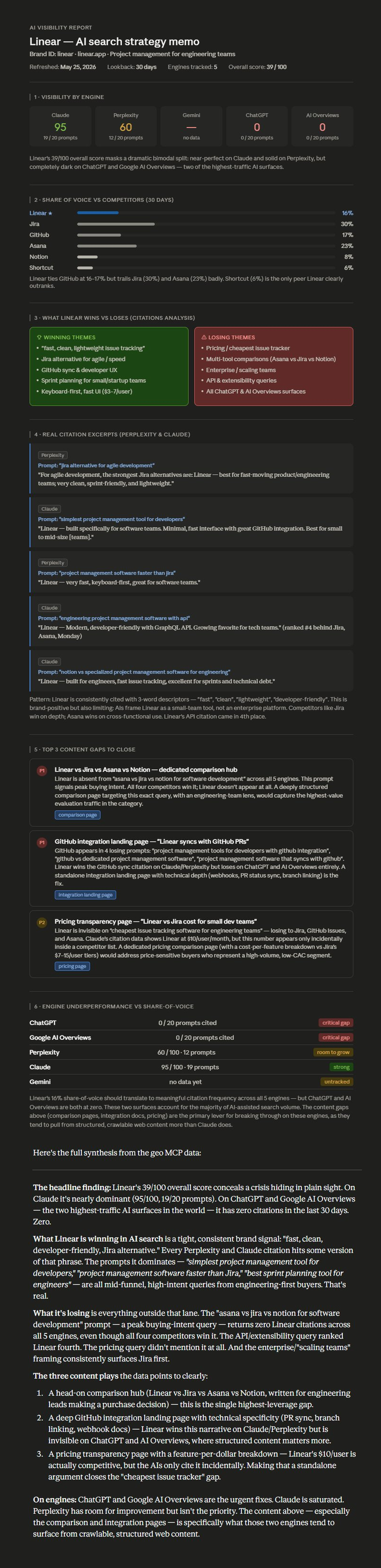
Connect mcp-geo to Claude, ask it to run an AI visibility analysis on your brand, and within 90 seconds you get a strategist-quality memo grounded in real per-engine data. Below is a real example.
The full report continues below with content gaps, engine breakdown, and synthesis. Click the image above to view it all.
Features
What's inside
Six analysis tools are available on both transports. The local npm CLI
also includes track_brand, list_brands, and
generate_prompts for nine tools in total.
check_visibility Latest AI visibility snapshot across all configured engines — per-engine scores, winning prompts, and losing prompts.
get_visibility_history Time-series history of overall and per-engine visibility, bucketed daily or weekly.
compare_competitors Share-of-voice comparison against competitor domains, with prompts you win and prompts they win.
get_citations The actual citation events — prompt, engine, response excerpt, citation type, brand URL when present.
get_content_gaps Prioritized content recommendations targeting your losing prompts.
refresh_brand Manually trigger a fresh scan across every engine whose API key is set.
Engines
Supported engines
- ChatGPT
- Claude
- Perplexity
- Gemini
- Google AI Overviews
Each engine is opt-in. You only configure the API keys you actually have — the worker simply skips engines whose credentials aren't set. The recommended starting pair is OpenAI + Anthropic; Gemini's free tier is rate-limited and Google AI Overviews (via SerpAPI) often returns no result, so add those deliberately once you want more coverage. Per-prompt cost estimates for every engine are in the README.
Setup
Run it locally with npm
The local CLI keeps its SQLite data on your machine and adds three brand-management tools. Set at least one supported engine API key; engines without a key are skipped.
claude mcp add --transport stdio digestseo -s user --env OPENAI_API_KEY=your_key_here -- npx -y digestseo-mcpOr connect your Cloudflare Worker to Claude.ai
- In Claude.ai → Settings → Connectors → Add custom connector.
-
Paste your worker URL after deploy (looks like
https://YOUR-WORKER.YOUR-SUBDOMAIN.workers.dev/mcp). -
Complete the OAuth handshake. With the recommended
CONNECT_SECRETset, enter that secret in the browser before a token is issued. Without it, anyone who knows your Worker URL can connect. -
Ask Claude:
"Check the AI visibility for brand_id acme."
Or connect the Worker to Claude Code
claude mcp add --transport http digestseo https://YOUR-WORKER.YOUR-SUBDOMAIN.workers.dev/mcp
Claude Desktop, Cursor, and Codex CLI can use either the local npm package
or connect to the Worker through
mcp-remote
— copy-pasteable configs for each client are in the
README.
Deploy
5-minute self-host on Cloudflare
# Full walkthrough with explanations: SETUP.md
git clone https://github.com/AKzar1el/mcp-geo.git
cd mcp-geo
npm install
npx wrangler login
cp wrangler.example.jsonc wrangler.jsonc

# Create KV + D1, paste the printed ids into wrangler.jsonc
npx wrangler kv namespace create OAUTH_KV
npx wrangler d1 create digestseo-db

# Required secret + at least one engine API key
npx wrangler secret put SEED_SECRET
npx wrangler secret put CONNECT_SECRET   # Recommended: gates who can connect
npx wrangler secret put OPENAI_API_KEY      # ChatGPT engine
npx wrangler secret put ANTHROPIC_API_KEY   # Claude engine + prompt generation

# Apply migrations and deploy
npx wrangler d1 migrations apply digestseo-db --remote
npx wrangler deployDigestSEO workspace
Start with a hosted workflow.
Create an account to try the DigestSEO workspace and keep your Site Audit projects in one place. For AI visibility tracking, self-host mcp-geo on Cloudflare.
Star the repo. Self-host in 5 minutes.
MIT licensed. 5 AI engines. Native MCP integration.
Full AI visibility report