
Mide tu visibilidad en IA antes de intentar mejorarla.
mcp-geo genera preguntas reales, consulta varios motores y guarda las citas de tu marca y de tus competidores. Es una forma transparente de entender el SEO para ChatGPT y otros buscadores generativos.
- Worker / local tools
- 6 / 9
- AI engines
- 5
- Setup time
- ~5 min
- License
- MIT
Información
What is mcp-geo?
mcp-geo is an open-source Model Context Protocol (MCP) server for tracking how your brand is cited by AI search assistants. It runs prompts against ChatGPT, Claude, Perplexity, Gemini, and Google AI Overviews, then stores raw citations and computed visibility metrics so you can query them from any MCP client.
Run the npm package locally with SQLite for all nine tools, or self-host the six analysis tools on Cloudflare Workers + D1 for scheduled refreshes and remote access. You bring only the engine API keys you want to use.
Built for indie SaaS founders and small marketing teams who want to track AI visibility without paying for a bloated enterprise SEO suite. Read the full README and SETUP.md on GitHub.
Qué produce
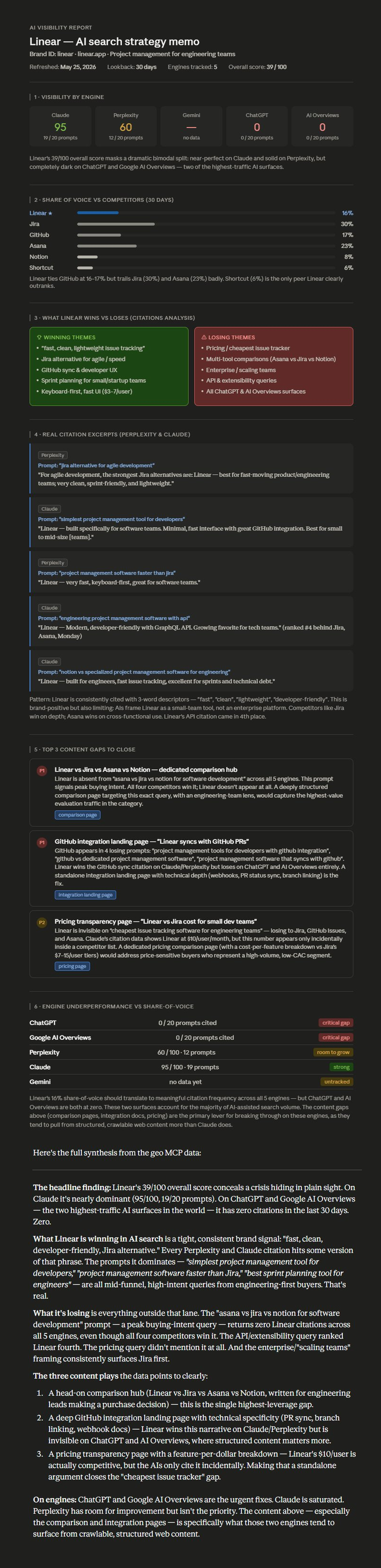
Connect mcp-geo to Claude, ask for an AI visibility analysis, and get a strategist-quality memo grounded in per-engine data.
Features
What's inside
Six analysis tools are available on both transports. The local npm CLI also includes brand management and prompt generation tools.
check_visibilityPrompts de tu categoría: Define tu marca, categoría y competidores para generar preguntas que tus clientes podrían hacer a un asistente.
get_visibility_historyCitas por motor: Compara menciones y fuentes en ChatGPT, Claude, Perplexity, Gemini y Google AI Overviews.
compare_competitorsDatos bajo tu control: Aloja el MCP en Cloudflare Workers y configura solo las claves de los motores que realmente utilices.
get_citationsThe actual citation events with prompt, engine, excerpt, type, and brand URL.
get_content_gapsPrioritized content recommendations targeting your losing prompts.
refresh_brandManually trigger a fresh scan across every engine whose API key is set.
Motores
Motores
- ChatGPT
- Claude
- Perplexity
- Gemini
- Google AI Overviews
Each engine is opt-in. Configure only the keys you have; the Worker skips engines without credentials.
Configuración
Run it locally or connect Claude
The local CLI keeps its SQLite data on your machine. The Worker transport supports remote MCP clients through OAuth.
Ejecutarlo localmente
claude mcp add --transport stdio digestseo -s user --env OPENAI_API_KEY=your_key_here -- npx -y digestseo-mcpConectar el Worker
- In Claude.ai, open Settings → Connectors → Add custom connector.
- Paste your Worker URL after deploy (ending in /mcp).
- Complete the OAuth handshake and ask Claude to check an AI visibility report.
claude mcp add --transport http digestseo https://YOUR-WORKER.YOUR-SUBDOMAIN.workers.dev/mcpDespliegue
5-minute self-host on Cloudflare
git clone https://github.com/AKzar1el/mcp-geo.git
cd mcp-geo
npm install
npx wrangler login
cp wrangler.example.jsonc wrangler.jsonc
npx wrangler d1 migrations apply digestseo-db --remote
npx wrangler deployEspacio de trabajo DigestSEO
Guarda tus auditorías en un solo lugar.
Crea una cuenta gratis para probar el espacio de trabajo de DigestSEO y guardar proyectos de Site Audit. Para medir la visibilidad en IA, autoalójalo en Cloudflare.
Star the repo. Self-host in 5 minutes.
MIT licensed. 5 AI engines. Native MCP integration.